
Understand the JavaScript SEO Basics
How Google processes JavaScript-powered websites—and what developers must do to ensure visibility, crawlability, and strong search performance.
Why JavaScript SEO Matters
JavaScript transformed the web from a document platform into an application platform. It powers interactive dashboards, dynamic storefronts, and seamless user experiences. But this flexibility introduced a new challenge: search engines must now interpret not just HTML, but also the code responsible for generating it.
For developers, this means SEO is no longer just about metadata and backlinks—it is also about rendering strategy, crawlability, and how efficiently search engines can access your content.
If your page depends heavily on JavaScript to display critical information, any delay or failure in execution can cause that content to remain invisible to search engines. In practical terms, your beautifully designed application may exist for users, but not for Google.
How Google Processes JavaScript
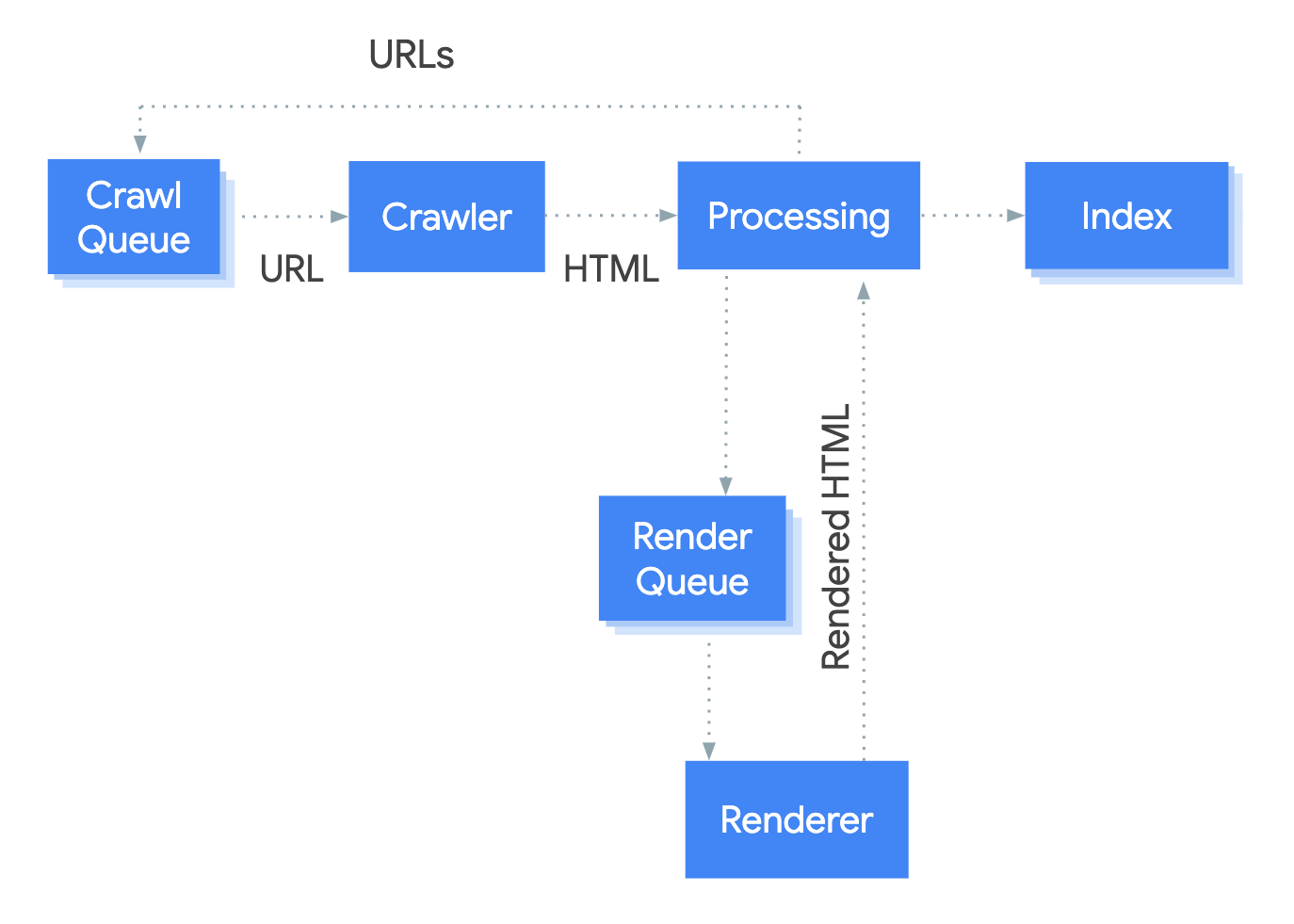
Google Search processes JavaScript-based pages in three distinct stages:
- Crawling: Googlebot discovers the page, checks permissions in
robots.txt, and downloads the initial HTML. - Rendering: A headless Chromium environment executes JavaScript to generate the final DOM.
- Indexing: Google analyzes the rendered output and stores it in the search index.
This pipeline is not always immediate. While crawling may happen instantly, rendering can be deferred based on Google’s available resources. That delay creates a gap where your content is temporarily unseen—or worse, partially processed.
Key Reality: Google can render JavaScript, but rendering is resource-intensive. If your site depends entirely on client-side execution, you introduce latency into the indexing process.
Crawlability & Link Discovery
Search engines discover content primarily through HTML links. This means your internal navigation must be structured around proper <a href> elements.
JavaScript-generated links are acceptable—provided they are injected into the DOM in a crawlable format. However, using non-standard routing patterns or relying exclusively on fragments can limit discoverability.
The Problem with Fragment URLs
URLs like #/products are unreliable for indexing because fragments are interpreted client-side and do not represent standalone resources.
Instead, use clean, path-based URLs and leverage the History API for navigation:
- Bad:
example.com#/products - Good:
example.com/products
Clean URLs ensure that both users and search engines can access individual views directly.
Rendering Delays & SEO Risk
JavaScript-heavy sites often follow an app shell model, where the initial HTML contains minimal content and JavaScript populates the page later.
While this works for users with modern devices, it creates challenges for search engines because meaningful content is unavailable until rendering completes.
The Two-Pass Indexing Model
- Pass 1: Google indexes the raw HTML response.
- Pass 2: JavaScript is rendered, and additional content is processed.
If the first pass contains only a loading spinner or an empty root div, your initial indexed version may be incomplete.
Delays in rendering can result in:
- Late content discovery
- Missing structured data
- Partial indexing
- Reduced crawl efficiency
Technical SEO Best Practices for JavaScript Apps
Use Unique Titles and Meta Descriptions
Titles and descriptions help search engines understand page intent. If they are generated dynamically, ensure each page sets them correctly and uniquely.
Set Canonical URLs Properly
The rel="canonical" tag prevents duplicate content issues. If JavaScript injects it, make sure it matches the canonical URL defined in your original HTML.
Return Meaningful HTTP Status Codes
Search engines rely on HTTP status codes to interpret page state.
- 200: Valid page
- 404: Not found
- 301: Permanent redirect
- 401: Restricted content
Avoid serving error pages with a 200 response—this creates soft 404s.
Avoid Soft 404 Errors in Single-Page Apps
In SPAs, invalid routes often still return a successful response because routing happens entirely in the browser.
To prevent search engines from treating these as valid pages:
- Redirect invalid states to a real server-side 404 page
- Add
<meta name="robots" content="noindex">dynamically
Without these safeguards, search engines may index pages that should not exist.
Performance & User Experience Impact
SEO and performance are tightly linked. Heavy JavaScript increases parse, compile, and execution time—especially on mobile devices.
This affects critical metrics such as:
- LCP (Largest Contentful Paint)
- TBT (Total Blocking Time)
- INP (Interaction to Next Paint)
A technically crawlable page can still rank poorly if it delivers a slow, frustrating experience.
Conclusion: Build for Both Users and Crawlers
JavaScript is not the enemy of SEO—but careless implementation is.
Modern search engines are capable of rendering dynamic applications, but they still reward efficiency, clarity, and accessibility.
The strongest strategy is to combine interactivity with a solid foundation:
- SSR for fast first-load visibility
- SSG for stable content delivery
- Hydration for selective interactivity
Final Insight: If search visibility matters, your content must exist before JavaScript becomes essential—not after it.